California architecture and BIM teams
California code compliance, checked while you design in Revit.
ARCHIMIND helps California architecture teams identify potential California Building Code issues earlier, directly inside Autodesk Revit. Check egress, accessibility, fire resistance, plumbing, occupancy, and more before potential problems become permit comments and rework.
Native Revit add-in for Revit 2023-2026 on Windows. CBC 2022 and CBC 2025 checks. Findings cite the relevant code section where supported by the implemented workflow.
Why it matters
Late code issues create expensive project work.
Many compliance issues are discovered after a design has already moved forward, when changes are slower, more disruptive, and more likely to affect coordination. Manual review can also make it difficult to maintain a consistent process across projects and teams.
ARCHIMIND is designed to help teams identify potential issues earlier, while the model is still being developed and changes are easier to make.
Manual review takes time
Teams spend valuable design and coordination time checking model conditions against code requirements.
Issues appear late
Potential problems discovered during plan check or later review can create comments, rework, and resubmission delays.
Review quality varies
A structured, code-linked workflow can help teams apply a more consistent review process across projects.
Illustrative product example
See what a review looks like
This walkthrough shows the ARCHIMIND workflow inside Revit. It is not a customer case study and does not represent measured savings, approval outcomes, or guaranteed compliance.
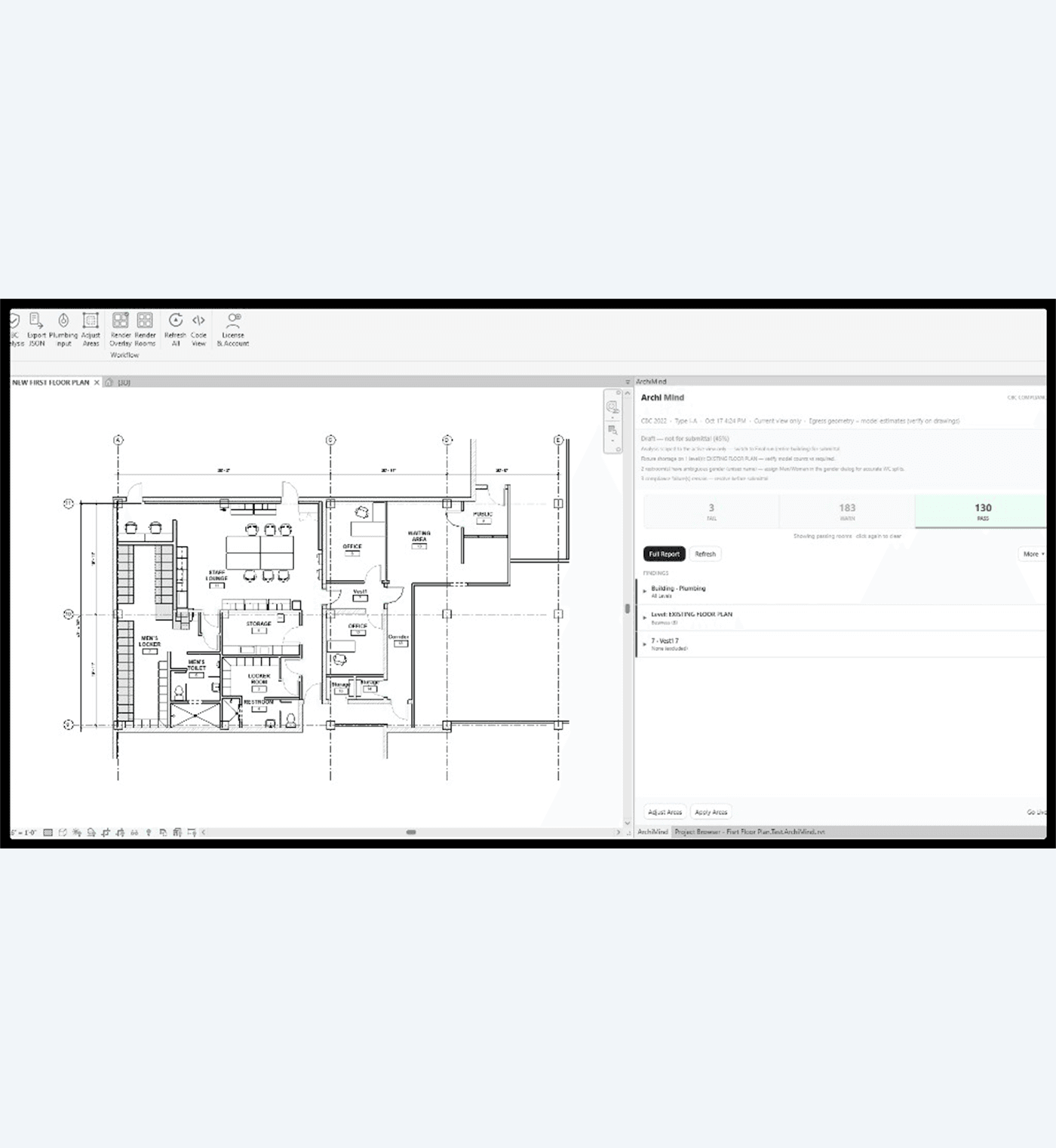
Example context: California project · egress and accessibility checks · CBC section cited per finding · element reviewed in Revit before submission.
Open a California Revit project
Work in an active model with walls, rooms, doors, and openings. These are the elements ARCHIMIND checks today.
Configure and start the analysis
Run CBC checks from the ARCHIMIND ribbon without exporting the model or leaving Revit.
Review structured potential findings
See a structured list of potential issues with the relevant CBC section cited where supported.
Locate the affected element
Select a finding and review the affected Revit element in context with overlays or warnings in the model.
Verify with the project team
Apply professional judgment, correct or verify the condition, and retain structured reports where supported.
How ARCHIMIND helps
A code-compliance layer inside your existing Revit workflow.
ARCHIMIND reads the Revit model directly and returns structured findings tied to the California Building Code. Teams can review potential issues in context, investigate affected elements, and use the results as part of their internal design and quality-control process.
Find potential issues earlier
Run checks while the design is developing, rather than waiting until the end of a project or until comments return.
See findings in context
Locate potentially affected Revit elements and review overlays and warnings in the model.
Understand the code basis
Findings are designed to cite the relevant CBC section where supported so the team can understand what is being flagged and verify the result.
Create a repeatable review process
Use structured reports and synced project history on your dashboard, where available, to support internal review, coordination, and team visibility.
Go Live
Keep compliance checks close to the design process.
With Go Live enabled, ARCHIMIND monitors relevant model changes and updates potential findings as the design evolves. Move a door, change a wall, or update a room, and the affected conditions can be checked without leaving Revit.
Monitors model changes
Move a door, change a wall, or update a room. Relevant conditions can be checked without leaving Revit.
Updates findings as you design
With Go Live enabled, ARCHIMIND keeps compliance checks close to the design process as the model evolves.
Re-checks what changed
Edits are tracked incrementally so affected areas are reviewed without re-running the entire model each time.
- Monitors relevant model changes.
- Re-checks affected conditions.
- Keeps findings close to the design process.
- Avoids restarting the entire review for every change.
Auto-fix
When a correction is unambiguous, apply it in the model.
For supported conditions where the correction is clear, ARCHIMIND can apply the change through a named Revit transaction. Each change remains undoable with Ctrl+Z. Teams should review every suggested or applied change before relying on it for project decisions.
Auto-Fix is not autonomous design or code approval. Teams should verify every suggested or applied change before relying on it for project decisions.
CBC coverage
Built around the checks California teams perform every day.
ARCHIMIND currently supports checks across more than 40 California Building Code sections, including egress, accessibility, fire resistance, height and area, light and ventilation, plumbing, occupant load, and CALGreen EV provisions.
Egress & exits
Clear width, travel distance, exits, and exit access.
Accessibility & DSA
Path of travel, DSA IR 10.2 & 11B-10
Fire resistance
Separations and fire-resistance requirements
Height & area
Allowable height and area provisions
Light & ventilation
Natural light and ventilation requirements
Plumbing fixtures
Required fixture counts by occupancy
Occupant load
Load factors and classification
EV charging
EVCS space provisioning
Trust
Built for real California design and review workflows.
ARCHIMIND was founded by Ali Jooyandeh, an architect and builder with 21 years of experience across architectural delivery, BIM coordination, California Building Code workflows, and projects involving K-12, higher education, civic, industrial, and DSA-related work.
ARCHIMIND is a design aid. The architect of record and project team are responsible for verifying findings, applying professional judgment, and confirming compliance before submission to DSA or any authority having jurisdiction. ARCHIMIND identifies potential issues and supports review. It does not guarantee compliance or approval.
Product demonstration
See one CBC analysis before you decide.
Run one product demonstration with no credit card to see how ARCHIMIND analyzes a Revit model and returns structured findings. This demonstration is separate from the Founding 5 Evaluation and is not unlimited access.
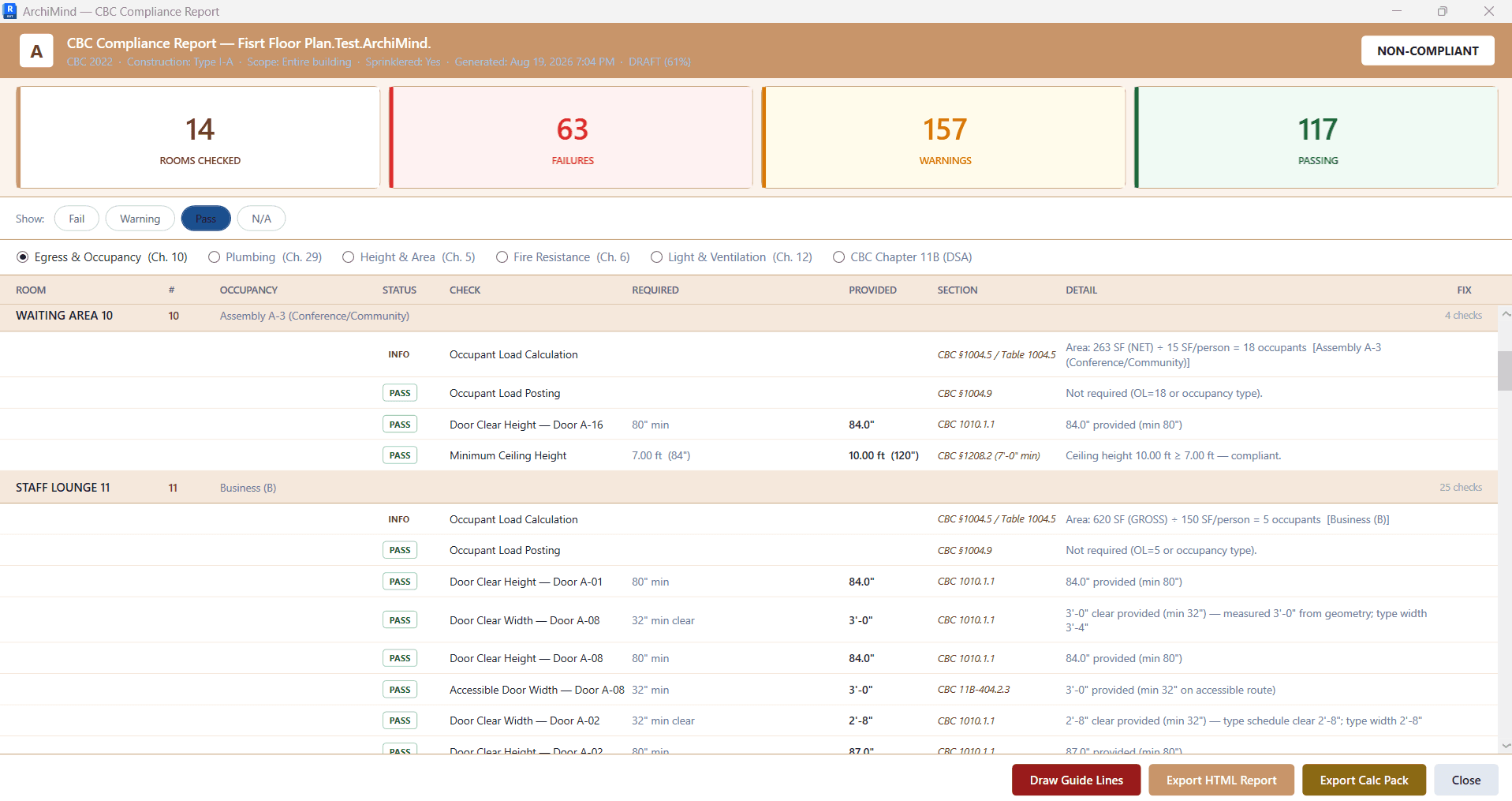
Illustrative ARCHIMIND output · 1 CBC analysis run · no credit card
Founding 5 Evaluation
Evaluate ARCHIMIND on a real California project.
The Founding 5 Evaluation gives a qualified California architecture team a structured way to test ARCHIMIND on one real project and assess workflow fit before choosing a subscription.
- One California project
- One team
- Up to 25 days or 3 project analyses
- CBC 2022 or CBC 2025 checks
- Guided kickoff
- Evaluation review call
- Findings and workflow feedback
This is a limited early-access evaluation for qualified California architecture teams with a real project to test. It is a request for evaluation and does not guarantee acceptance. A named internal owner, kickoff, and evaluation review call are required.
- No annual commitment is required when the evaluation begins.
- After the evaluation: monthly at standard pricing, or annual with 40% off year one.
- Initial seat count is declared at subscription. Seats added later are billed at standard pricing.
- Year two returns to standard pricing.
A single CBC product demonstration run may be available separately. It is not unlimited and is not the Founding 5 Evaluation.
Founding 5 application
Submitting this form is a request for evaluation and does not guarantee acceptance.
Pricing
Choose the path that matches your team.
Four subscription options plus a separate product demonstration and a structured Founding 5 Evaluation for qualified teams.
- Start with a demonstration if you want to understand the workflow.
- Request a Founding 5 Evaluation if you have a real California project and want guided testing.
- Choose a paid seat plan for ongoing team use.
- Talk with ARCHIMIND about an enterprise rollout when multiple teams or 15+ seats are involved.
Product demonstration
No credit card
One CBC analysis run to understand the workflow before choosing an evaluation or subscription.
Founding 5
Request only · not auto-accepted
One California project, one team, up to 25 days or 3 analyses, whichever comes first.
- One California project
- One team
- Up to 25 days or 3 project analyses
- CBC 2022 or CBC 2025 checks
- Guided kickoff
Pro
$129/seat/mo if billed monthly
For teams that need CBC analysis, code-linked findings, HTML reports, unlimited self-serve CBC runs, and email support.
- CBC 2025 & CBC 2022 compliance checks
- Code-linked findings where supported
- HTML structured report for internal review
- Unlimited CBC runs (self-serve only)
- Revit 2023-2026 · Email support
Pro Plus
Live$229/seat/mo if billed monthly
For teams that need everything in Pro plus Go Live, in-view issue flags, and supported undoable Auto-Fix capabilities.
- Everything in Pro
- Go Live: checks as you design
- Failing elements flagged in view
- Supported Auto-Fix (undoable Ctrl+Z)
- Priority support
Enterprise
15+ seats
Custom pricing for 15 or more seats, with volume terms, dedicated onboarding, a named firm contact, and workflow-fit review.
- 15+ seats
- Custom pricing & volume terms
- Dedicated onboarding
- Named firm contact
- Workflow fit review
- Founding 5 annual conversion: 40% off year one.
- Standard annual billing outside the Founding 5 offer: 20% savings.
- These are separate paths. The discounts do not stack.
Ready to see whether ARCHIMIND fits your California Revit workflow?
Request an evaluation or run a product demonstration. ARCHIMIND is a design aid. The architect of record remains responsible for verification and compliance decisions.